All the business tools for Restaurants & Cafés, all in one platform.
Basehand keeps your menus, website, orders, messages, and reviews up to date, day and night, so you can stay on the floor, behind the counter, and in the kitchen.
7 days free. No card needed.
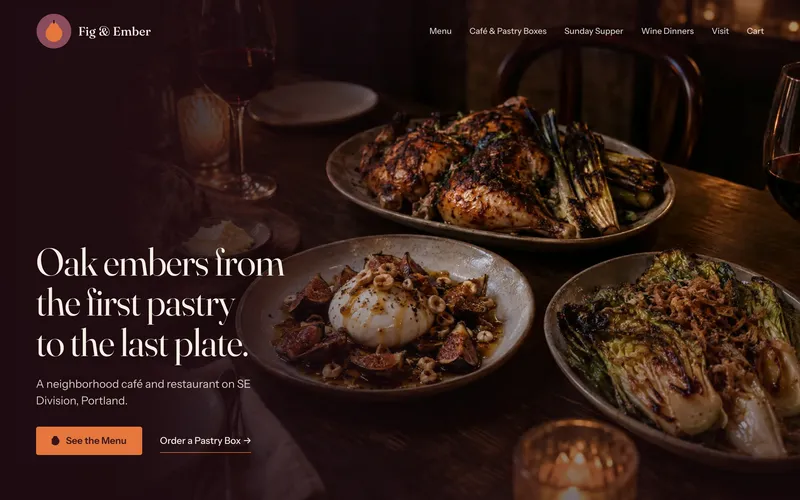
Website and menus
A website as up to date as your kitchen.
Basehand designs a website that leads with your food, your hours, and one clear way to book or order. Its menus come straight from your Menu page, so a dish or a pastry you change, or mark sold out, changes on the site at once.
- Your menu read in from your old website, a PDF, or a photo of the card or the board, with nothing to retype.
- Next month's menu written now, and live at 5 pm on the 1st.
- A whole section's prices raised or lowered in one step.
- Allergens and dietary labels shown the way your country's rules ask.
- Your reservation system kept: Book a Table goes straight to it.
Printed menus
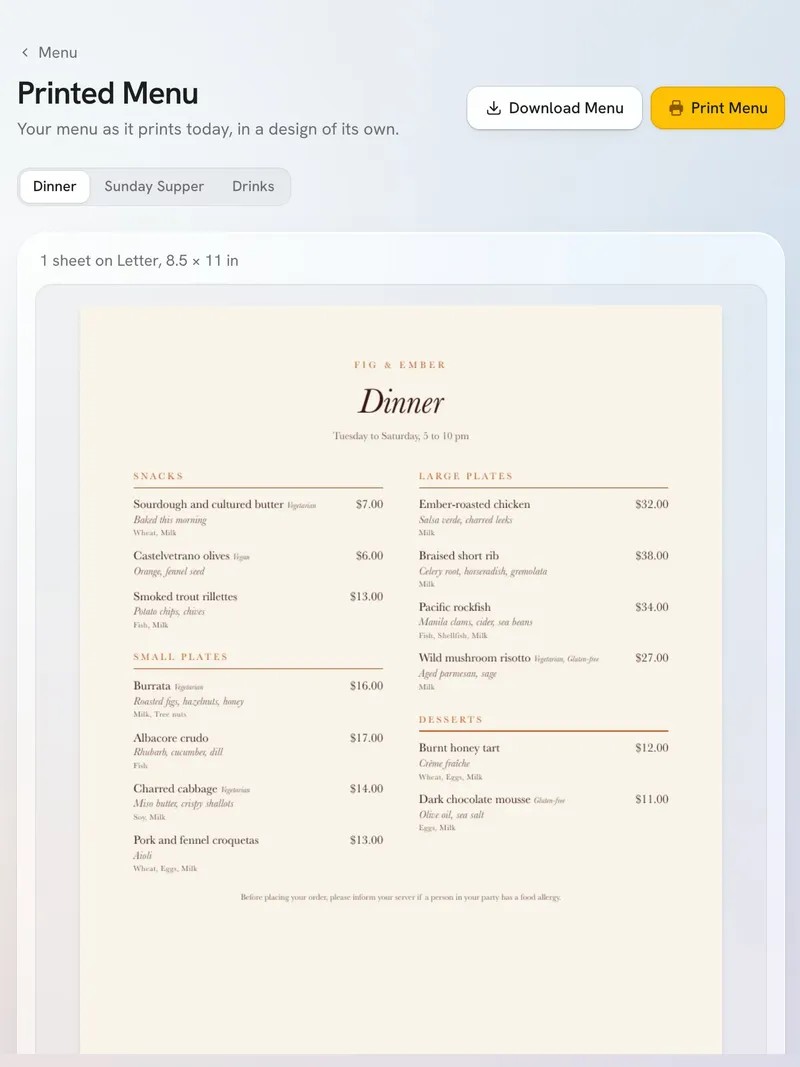
Printed menus that always match.
The Hand designs your printed menu for the paper you print on, in your colors and type. It's set from the same dishes and prices as your website, so the next print is already right.
- A PDF ready to print in house, or to send to your printer.
- Every menu you serve, from breakfast to drinks, in the same design.
- Posters and flyers for wine nights, holidays, and new menus, in the same look.
Order ahead
Order online, pick up warm.
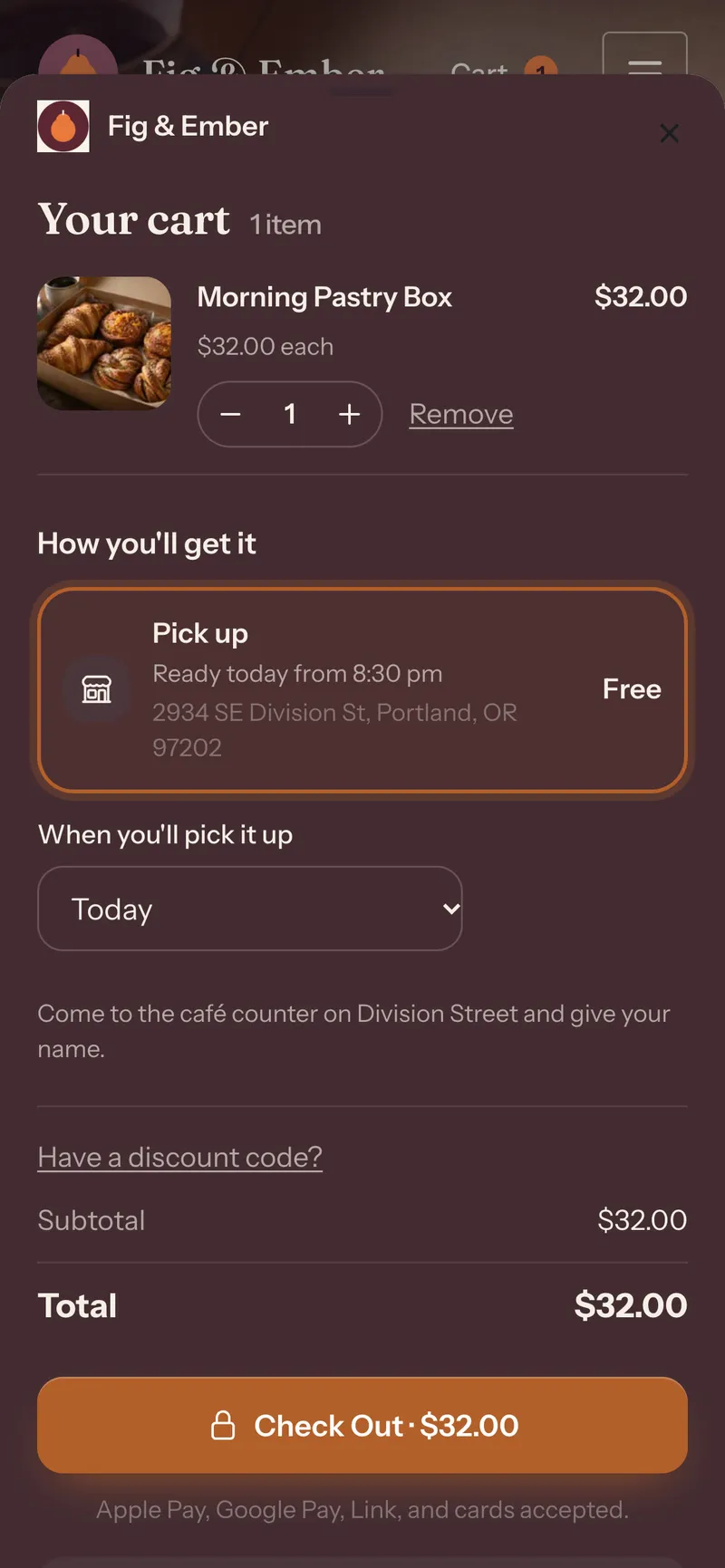
Sell pastry boxes, loaves, coffee beans, holiday pies, and hampers on your website, for pickup, local delivery, or shipping. Orders come in with a pickup time, and you mark them ready from the counter.
- Stock counted, so you never sell more than you made.
- Pickup times, delivery, and shipping, chosen at checkout.
- Apple Pay, Google Pay, and cards through Stripe.
Events and classes
Sell out your wine dinners and classes.
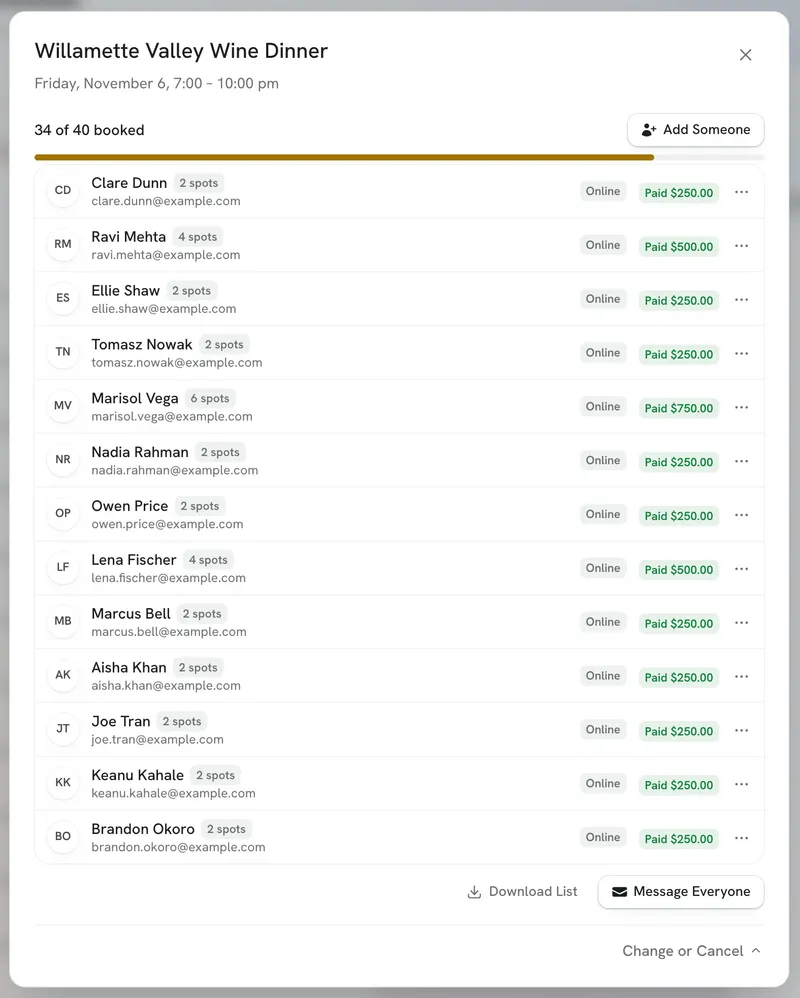
Wine dinners, supper clubs, tastings, and baking or cooking classes get a booking page with set times and seats, paid in full or by deposit when guests book.
- A waitlist when every seat is gone.
- One message to everyone coming, and the guest list to download.
- Reminders the day before, and a thank-you after.
Messages
Every question answered, even mid-service.
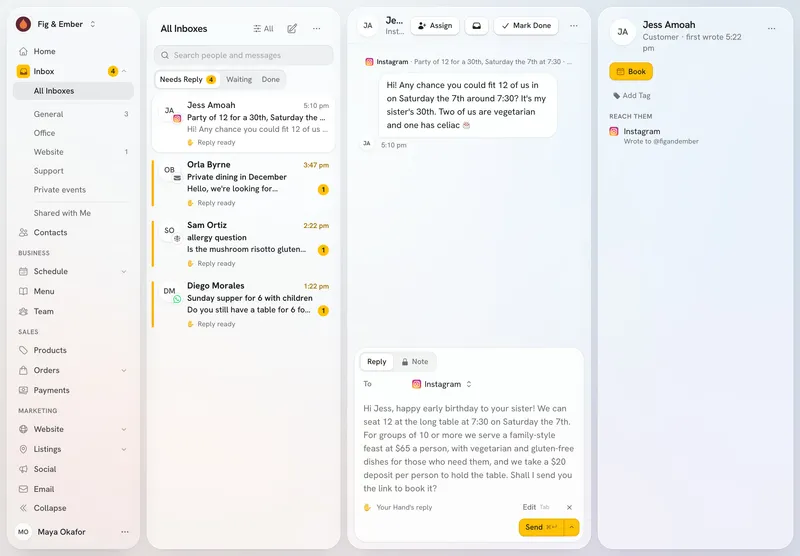
Instagram, TikTok, and Facebook messages, texts, emails, and your website's forms land in one inbox. The Hand drafts each reply with your hours, menus, prices, and group policies, for you to check and send.
- Large parties, catering, cake orders, and private hire, answered in your voice.
- Order forms on your site that ask for everything, from the date to the writing on the cake.
- Text the Hand from the pass by iMessage, SMS, or WhatsApp.
- Each message has one owner, so nobody answers it twice.
Reviews and regulars
Turn a great visit into a five-star review.
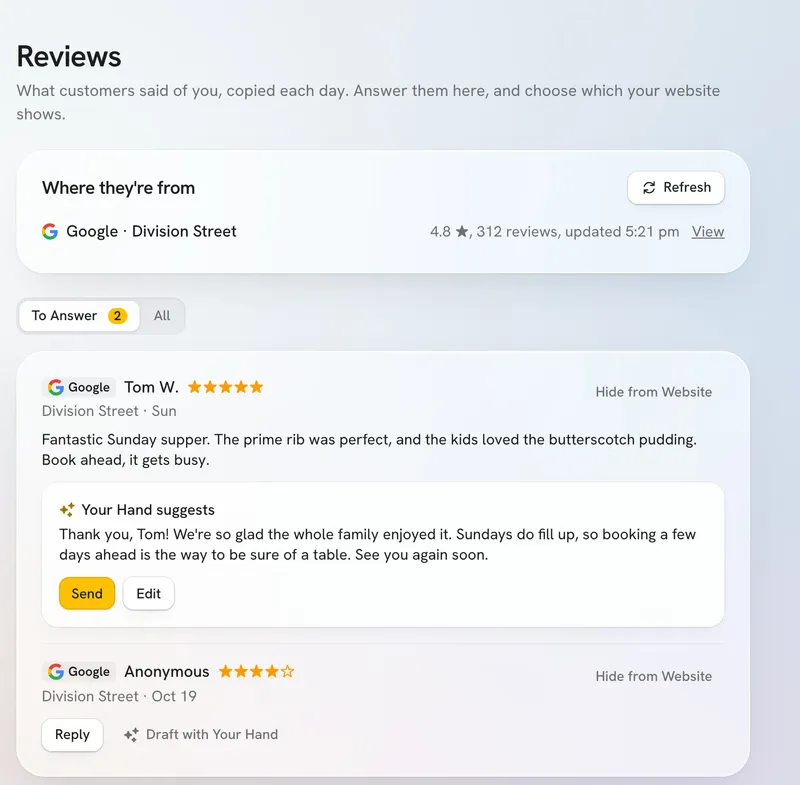
The Hand drafts a thoughtful reply to every Google review, and your best reviews show on your website. Then it keeps regulars coming back, with newsletters and posts that go out on time.
- Replies sent only when you approve them.
- Newsletters to the guests who asked for them: the new menu, the wine dinner, holiday orders.
- One post to Instagram, Facebook, and TikTok, scheduled for when people are hungry.
One Friday
From the first coffee to close, an extra hand.
What the Hand takes care of on a busy Friday at a neighborhood restaurant or café, while the team cooks and serves.
-
Friday at 7:10 am
Takes the weekend's preorders
Pastry boxes and holiday pies sell online overnight, paid upfront, with stock counted down.
-
Friday at 3:10 pm
Puts tonight's special on the menu
You text it from the walk-in. Once you approve, it's on the menu and the website, with an Instagram post to match.
-
Friday at 6:45 pm
Takes sold-out dishes off your site
A server taps Sold Out on the short rib. The website shows it at once, and the dish comes back by itself tomorrow.
-
Friday at 7:30 pm
Drafts your reply to a party of 12
An Instagram message asks about a 30th birthday. The reply comes with your group menu and deposit, ready for you to send.
-
Friday at 9:40 pm
Sells your last wine dinner seats
Guests book and pay upfront online while you cook. When the room is full, the next one joins the waitlist.
-
Friday at 11:55 pm
Writes back to a five-star review
A thoughtful reply to tonight's Google review is drafted and waiting for you to send in the morning.
 Mid-service or after close, the Hand keeps up, and you approve what goes out with a tap.
And the rest
Everything else a restaurant or café runs on.
-
Holiday hours
Closures and special hours show on your website the moment you set them, and the Hand reminds you before each public holiday.
-
QR codes for the table
Print a code for each table, the counter, or the window, point it at your menu, and see how many people scan it.
-
More than one location
Each location, from a second café to a market stall, keeps its own hours and menus, and a dish runs out only where it ran out.
-
The whole team
Servers and counter staff can mark dishes sold out and answer messages from their phones. You choose who publishes changes.
-
Email at your own address
Send and receive from an address at your own domain, like bookings@, in the same inbox as everything else.
-
Books and sales tax
Every sale, fee, and payout in one set of books, with sales tax worked out for you.
From the Handbook
Practical guides for running a business like yours.
-
Your business
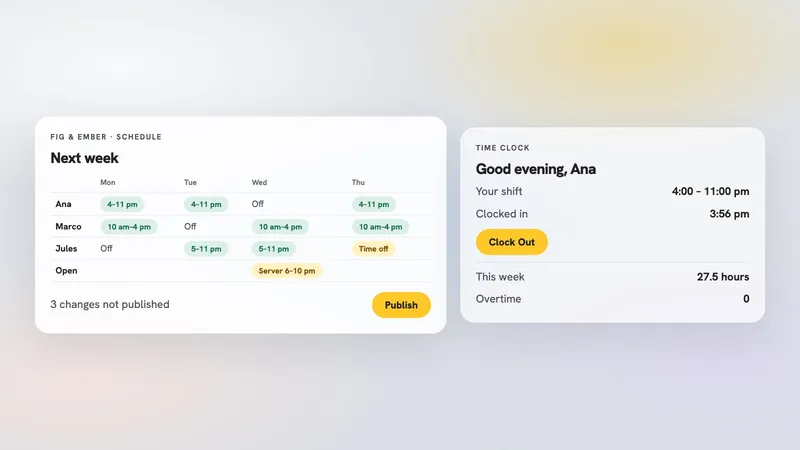
How to make a staff schedule your team will actually follow
A schedule your team can rely on is a weekly routine, not software: ask before you draft, publish on the same day, set simple swap rules, and record time to the minute.
-
Your business
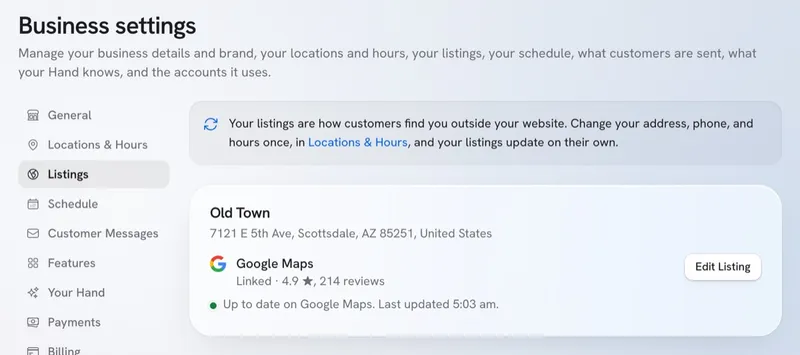
How to update your holiday hours everywhere at once
A customer who drives to a closed door on December 26 doesn't come back happy. How to plan your holiday hours and make sure Google, your website, and your bookings all say the same thing.
-
Getting paid
How to sell gift cards online before the holidays
Gift cards bring in money now and new customers later. How to choose the amounts, where to offer them, and what to get right so they're easy to buy, give, and spend.
Questions
What restaurants and cafés ask us
Does Basehand take table reservations?
Basehand books events, tastings, classes, and anything else with set times and seats, with payment when guests book. For everyday tables, keep the reservation system you already use: your website's Book a Table button goes straight to it.
Do I have to type in my menu?
No. Basehand reads your menu from your current website, a PDF, or a photo of the printed card or the board, and keeps it as a draft for you to check before it goes live.
Can customers order ahead for pickup?
Yes. Sell boxes, bakes, and hampers on your website for pickup, local delivery, or shipping, with the pickup times you choose. Set how many you made, and the website stops selling when they're gone.
Can my staff use it during service?
Yes. Each person gets their own account. Servers can mark a dish sold out or answer a message from their phone, and you choose who can publish changes.
How does it handle allergens?
Each dish keeps the allergens and dietary labels you give it, and your website and printed menu show them the way your country asks, with the allergy notice your guests need. Basehand never guesses an allergen.
We have more than one location.
The Pro plan runs several locations from one account, each with its own hours, menus, and sold-out dishes, so a market stall or a second café keeps its own. It covers two locations for $499 a month, and each additional location is $99 a month.
What does restaurant and café software like Basehand do?
Basehand builds your restaurant or café's website and keeps it current: your menus, sold-out dishes, opening hours, and holiday closures. It sells for pickup and delivery with stock counted, designs printed menus and posters, sells tickets for events and classes, gathers Instagram, Facebook, email, and website messages in one inbox, and drafts replies to Google reviews.
What does it cost?
Plans start at $79 a month. Every plan starts with a 7-day free trial, and no card is needed to begin.
Give your restaurant or café an extra hand,so you can get back to the food.