 Basehand
Working with AI
How small business owners can use AI: eight practical examples
AI is most useful to a small business when it clears the pile of work that eats your evenings. Eight practical places to start, what a good request looks like, and how to keep it honest.
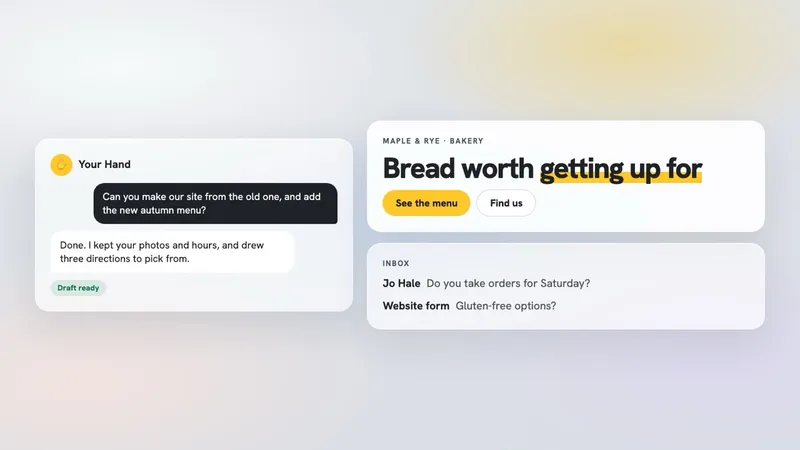
For most small business owners, the hard part of the job isn't the work itself. It's everything around it: the messages, the reviews, the posts, the emails, the paperwork. That's the work that spills into evenings and weekends, and it's where AI can help most today.
This isn't about replacing anyone. It's about getting a first draft in seconds instead of staring at a blank page, so you spend your time deciding rather than typing.
Start with where your time goes
Before you try any tool, spend a week noting the jobs that take your time outside the actual work. Then look for the ones that are:
Repetitive. You do them every day or every week, in much the same way.
Mostly writing. Replies, posts, descriptions, emails.
Easy to check. You'd know at a glance whether the result is right.
Jobs that tick all three are the best place to start. Jobs that need your judgment about a particular customer, or that can't be undone, are the ones to keep for yourself, or at least to approve yourself. Our guide to what an AI assistant should and shouldn't do goes into that line in detail.
Here are eight places where AI earns its keep in most small businesses.
1. Answering customer messages
Most messages ask the same handful of things: prices, availability, directions, what to bring. An AI assistant that knows your business can draft an answer to each one as it arrives. You read it, change a word or two, and send it.
The saving isn't only time. It's speed. A customer who gets a good answer in ten minutes books with you, not with whoever answered first. Our guide to answering customer messages covers the rest of the routine.
2. Replying to reviews
Every review deserves a reply, and most owners mean to write them and never quite do. AI is good at a short, warm thank-you that mentions what the customer actually said. For critical reviews, it can give you a calm first draft to work from, which is often the hardest part. Here's how to get more reviews to reply to.
3. Writing social posts
Give an assistant a photo and a sentence about what's new, and it can write the caption, the hashtags, and a version for each place you post. You choose the picture and the timing. It does the wording.
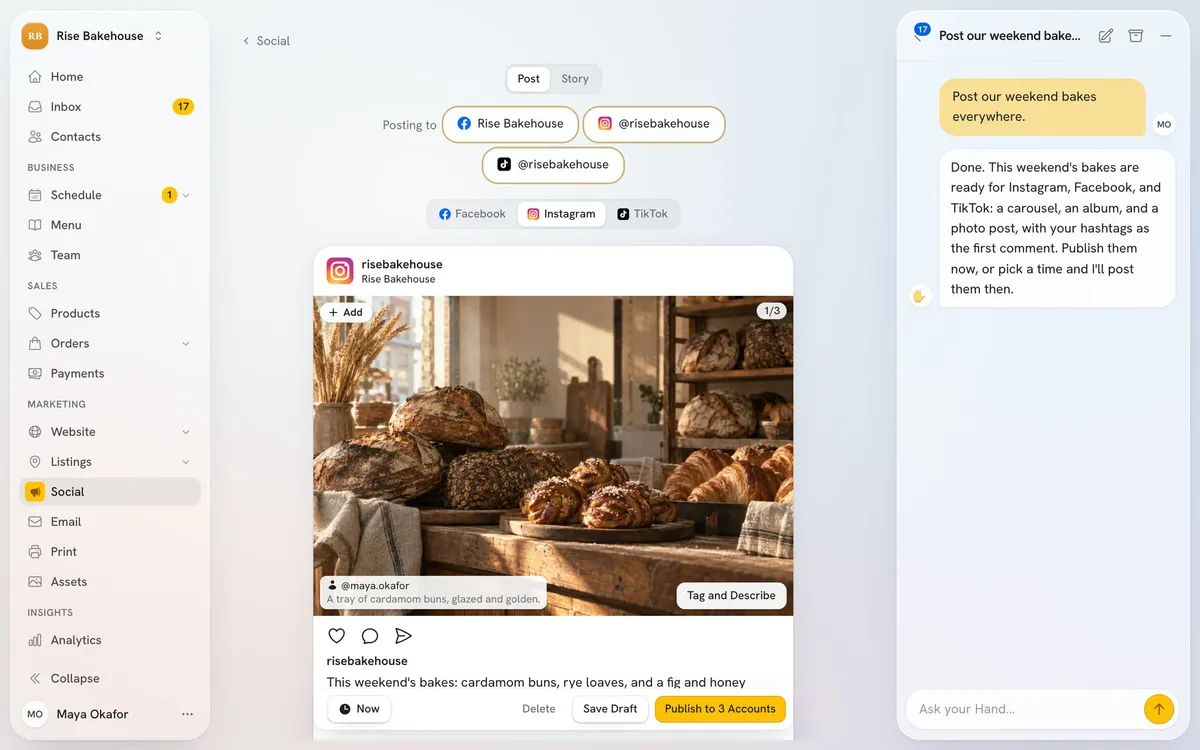
"Post our weekend bakes everywhere." One request, one post ready for each account, published when the owner says.
4. Sending an email newsletter
A short email to your customers every few weeks is one of the most reliable ways to bring people back, and one of the most often skipped. An assistant can turn "remind people the pumpkin bread is back and the sourdough class has spaces" into a designed email with a clear button, ready for you to read and send.
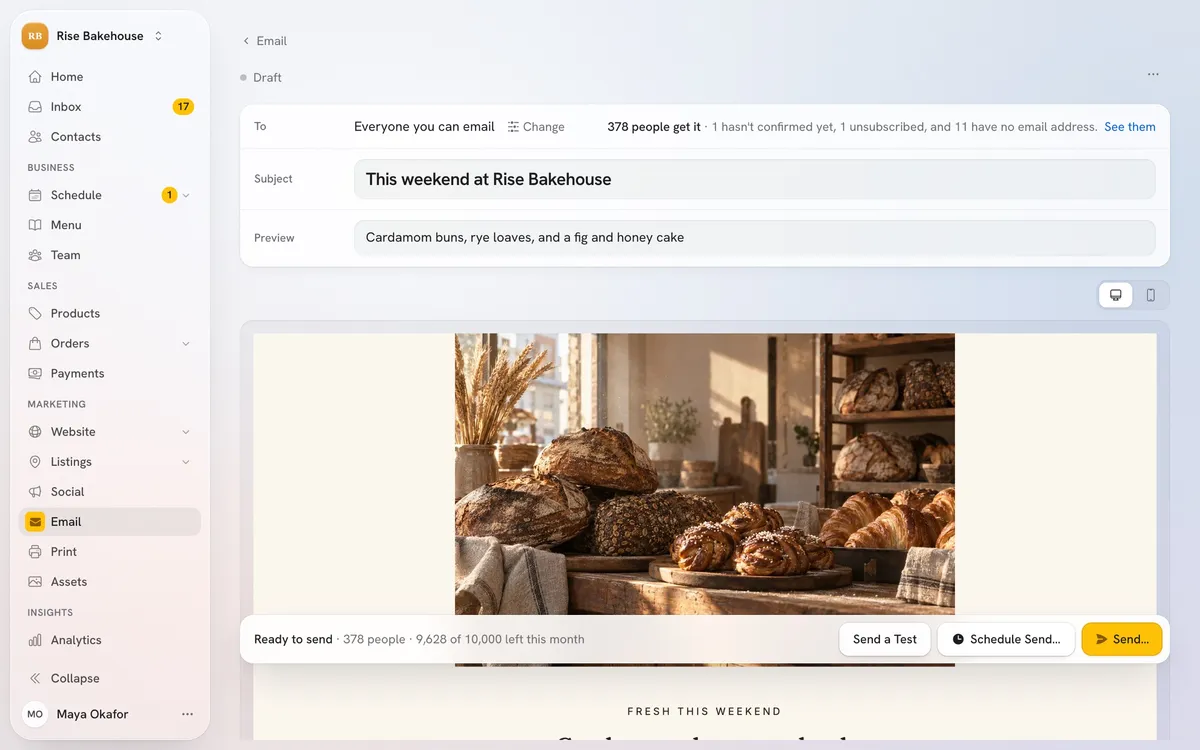
A newsletter drafted from one sentence, with the list it's going to and a button to send a test first.
Afterward, look at what happened. Which links were clicked, and did anyone book? That tells you what to send next time.
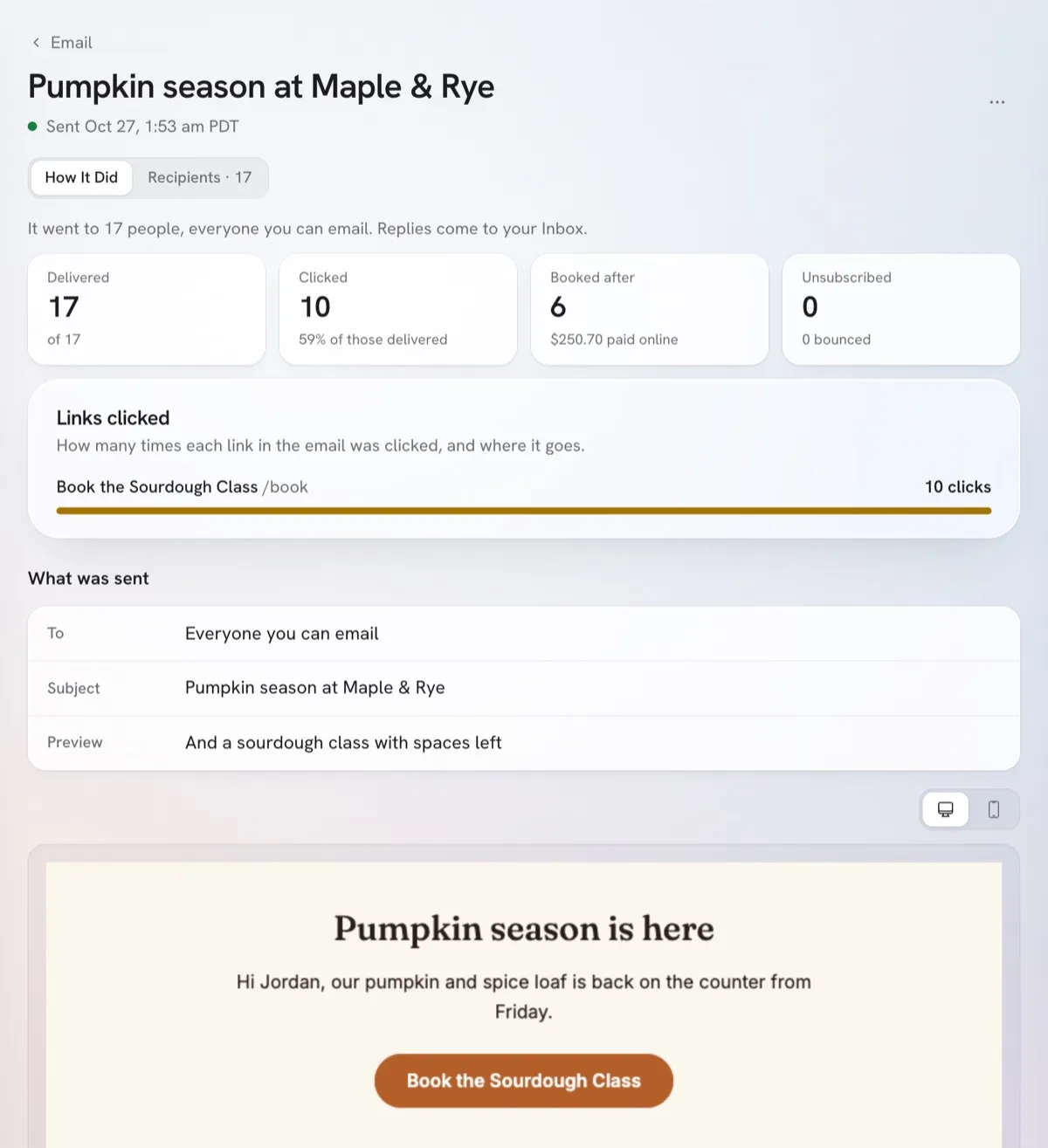
What came of an email: who it reached, what they clicked, and what they booked afterward.
5. Making posters and flyers
A poster for the window, a flyer for the counter, a card with a QR code to book. These used to mean a designer or an evening with a template. Now you can describe what you need, look at a design, and ask for changes in plain words until it's right.
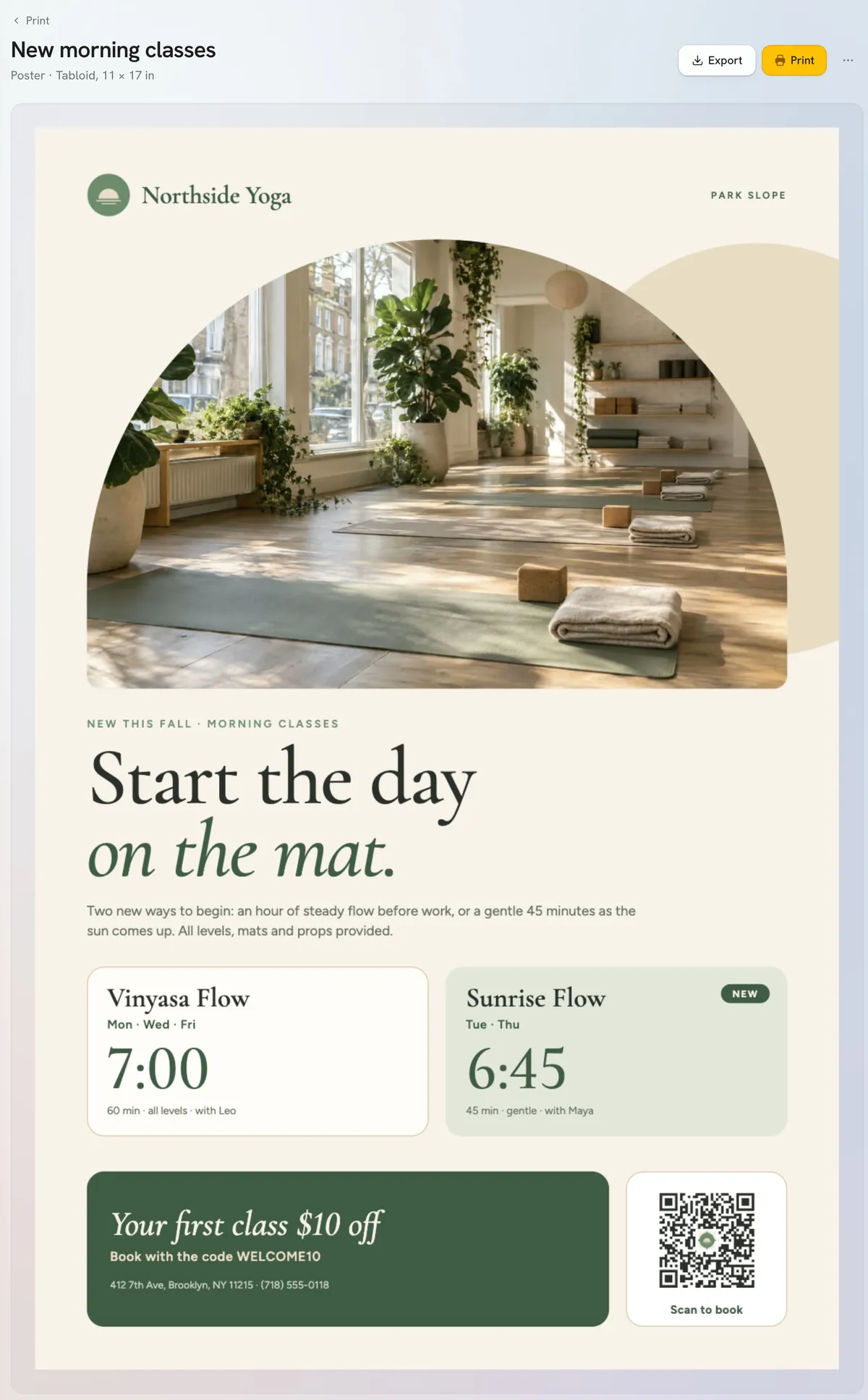
A poster for new morning classes, with a QR code that leads straight to booking.
6. Keeping your website current
Websites go out of date because changing them is a chore. When you can say "put the Sunday supper at the top of the home page" and see the change before it goes live, you make the change the same day instead of next month. An assistant can also notice things that need updating, such as an offer that's ended.
7. Doing the research
Comparing suppliers, checking what other businesses nearby charge, finding which local events to take part in. AI can gather it into a short report in minutes. Insist on sources: a good report shows where each fact came from, so you can check anything that matters before you act on it.
8. Keeping track of what's next
Quotes waiting for an answer, orders to make, customers who went quiet. An assistant that can see your work in progress can tell you what needs doing today and draft the next step, such as a quote from what the customer asked for, or a friendly check-in with someone who hasn't replied.
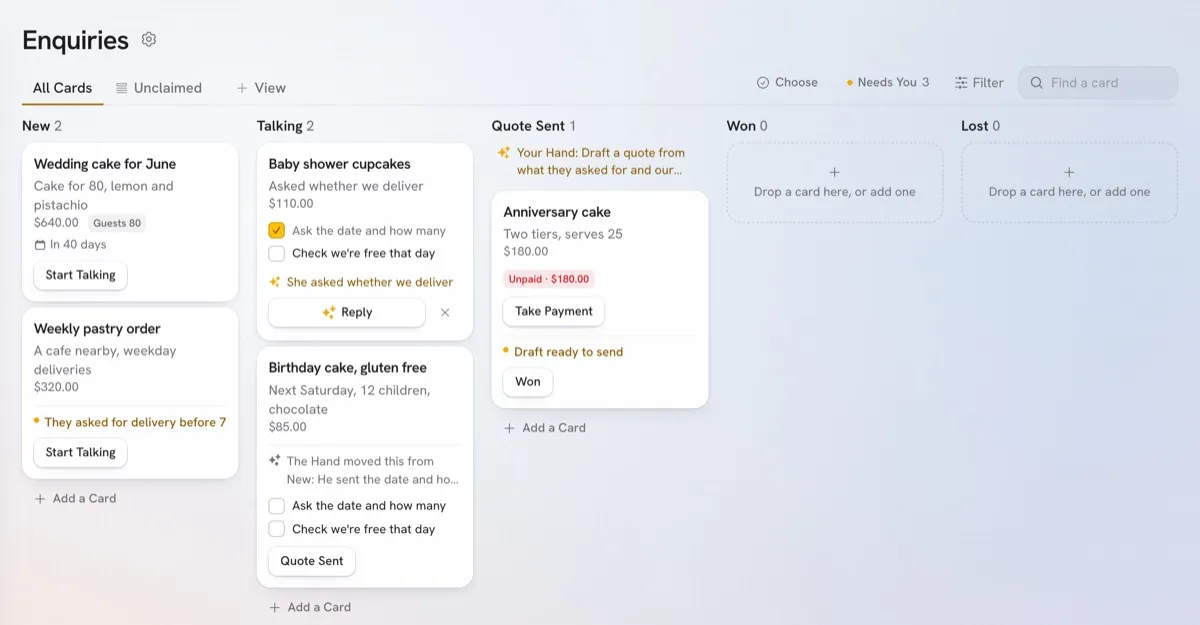
Each enquiry on a board, with the next step suggested where one is due.
How to ask for what you want
The quality of what you get back depends a lot on what you ask. A few habits help:
Give it the facts. "Write a post about our new class" gets something generic. "Write a post about our new Sunrise Flow class, Tuesdays and Thursdays at 6:45, 45 minutes, gentle, for beginners" gets something you can use.
Say who it's for. Regular customers, new customers, other businesses. The tone changes.
Show an example. If you've written something you liked, share it and ask for the same style.
Ask for changes in plain words. "Shorter." "Less formal." "Mention the parking." You don't need special phrasing.
Read it before it goes. Check every fact, especially prices, dates, and anything you'd be held to.
Keep it honest
Customers can usually tell when something was written without care, whoever wrote it. Keep AI drafts sounding like you: cut anything you wouldn't say, and never let it invent reviews, results, or promises. Your name is on what you send.
Getting started this week
Pick one job from your list, such as replying to messages or reviews
Use AI for that job for a week, reading every draft before it goes
Note how much time it saved, and what you had to fix
If it helped, add the next job. If it didn't, you've lost a week of trying, not a customer.
Requests you can copy
These work with any AI assistant. Copy one, fill in the words in square brackets, and read what comes back before it goes anywhere.
A reply to a customer
Draft a reply to this message from a customer. Keep it under 80 words, friendly and plain. Our [service] costs [price] and takes [length]. Offer [day and time] or [day and time], and end with this booking link: [link]. Don't promise anything I haven't told you.

The message: [paste the customer's message]
A reply to a review
Draft a reply to this Google review. Thank [reviewer's first name] by name, mention [the thing they liked], and keep it to two or three sentences. Don't use a stock thank-you, and don't offer anything in return for the review.

The review: [paste the review]
A social post
Write a post for [Instagram and Facebook] about [what's new, such as "our pumpkin bread, back from Saturday"]. Our customers are [who they are]. Keep it under 60 words, in our usual tone: [describe it, or paste a post you liked]. End with [how to book or buy]. Suggest five hashtags for Instagram only.
An email newsletter
Write a short email to our customers about [the two or three things to tell them]. Give it a subject line under 50 characters and one main button: [what it does, such as "Book a class", and its link]. Keep it under 150 words. It should sound like a [kind of business] owner writing to regulars, not like an advert.
A poster
Design a poster for [where it goes, such as "our front window"] announcing [what]. Include [the dates, times, and price], a QR code for [link], and our logo. Make [the headline] readable from across the street.
Research
Find [three to five] [suppliers of X / businesses near us that offer Y] within [area]. For each, give [the details you need, such as prices, delivery days, and minimum orders], with a link to the source of every fact. Say clearly when you couldn't find something.
How Basehand helps
Basehand's AI assistant, the Hand, does each of these inside the same app you run your business from, so it already knows your services, prices, hours, and customers. It drafts replies to messages and to recent Google reviews, writes social posts for Facebook and Instagram, designs email newsletters and shows you what came of them, makes posters and flyers to print, changes your website when you ask in plain words, writes research reports with their sources, and suggests the next step on a board's cards.
You stay in charge of what goes out. A person sends every reply, and anything that reaches customers, costs money, or changes your live website waits for someone to approve it. Read more about the Hand.