 Basehand
Your website
How to build your own small business website with AI
AI can draft a small business website in minutes, but what you give it and how you check it decide whether it's any good. The steps, in order, with requests you can copy into any AI tool.
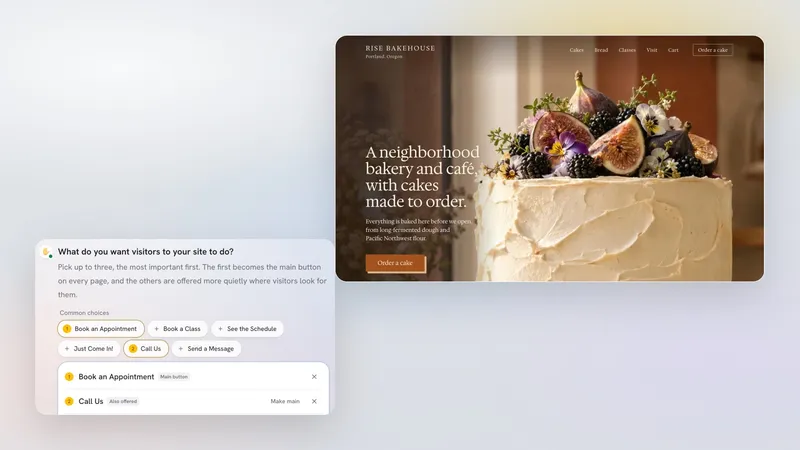
AI can now draft a whole website for a small business in minutes: the pages, the words, the layout, and the colors. That's a real change for owners who never had the time or the budget for a designer. But a fast draft isn't the same as a good website. Many AI-built sites look like everyone else's, with vague lines like "quality you can trust," and a few facts the AI simply made up.
The difference is almost never the tool. It's what you give it to start from, what you ask it for, and how carefully you check what comes back. This guide walks through it in the order you'd do it, whichever tool you use.
Gather what the AI should start from
An AI writes from what it's given. Give it little and it fills the gaps with guesses, which is where the generic lines and the wrong opening hours come from. Before you start, collect:
Your current website, if you have one, even an old one
Your Google Business Profile, and your Instagram or Facebook page
Your logo, in the largest file you can find
Twenty or so of your own photos: your space, your team, your work
Your address, phone number, and opening hours
What you sell, with prices or "from" prices
A handful of your best reviews
Most tools can read a website or a link for you, so you rarely need to type this out. What matters is that it's your real material, not the AI's idea of a business like yours.
Decide what a visitor should do first
Every good small business website has one main action: book an appointment, order online, call for a quote, or just come in. Decide which it is before you start, and tell the AI. It will build the first screen around it, with one button that stands out, instead of five buttons that compete.
If you have a second action, say so too, but say which one comes first. Our home page checklist explains why one clear button beats several.
Say why customers choose you, in your own words
This is the part most owners skip and the part that matters most. Left alone, an AI describes your business the way it would describe any business like it. Tell it what you'd tell a customer at the counter:
What you do best, and something that backs it up ("Every color starts with a free consultation")
What customers say about you, in their words
Anything you do that others nearby don't
A sentence or two is enough. It's the difference between "We're passionate about bread" and "Sourdough fermented for 36 hours, baked before 6 every morning."
Keep the pages few
A small business rarely needs more than five or six pages: a home page, your services or menu with prices, an about page, how to find you, and a way to book or order. Name them yourself rather than letting the AI invent a dozen thin ones.
If you're replacing an old website, choose which of its pages carry over. Pages people find on Google today are worth keeping, at the same addresses where you can, or with a redirect from the old address to the new one.
Compare a few directions before you pick one
Don't accept the first design. Ask for two or three different directions, each with its own look and its own first screen, and compare them side by side. Judge each one by what a customer would see:
Does the first screen say what you do, and where?
Is the main button obvious?
Do your own photos lead, or stock pictures?
Does it feel like your business, or like a template with your name on it?
Does it still work on a phone?
Pick the one that's closest, then ask for changes to it. It's much easier to adjust a design you like than to describe one from nothing.
Check every fact before it goes live
AI tools are confident even when they're wrong. Before anything is published, read every page as if a stranger wrote it, and check:
Opening hours, including holidays, and your address and phone number
Prices, and every service listed. Is there one you don't offer?
Claims you can't back up, such as "award-winning" or "the best in town"
Reviews and testimonials. Use only real ones, word for word, from real customers
Photos of people. Are they your team and your customers, or strangers?
The reviews matter more than they seem. In the US, the FTC's rule on consumer reviews bans fake reviews and testimonials, including ones written by AI, and businesses can face penalties for publishing them. If you have only a few real reviews, here's how to get more Google reviews.
Then open the site on your phone and try to do the main thing yourself: book, order, or call.
Change it by asking, and keep it current
The best part of building with AI comes after launch. You no longer need to learn an editor to change a line. Ask for the change in plain words ("Put our Sunday supper at the top of the home page"), look at the page before and after, and only then publish it.
A website goes out of date quietly, one changed price or new holiday at a time. Keep your hours, address, and prices in one place that your site reads from, so a change there reaches everywhere. Our guide to holiday hours shows how.
Requests you can copy
Use these with any AI website tool or AI assistant. Fill in what's in brackets.
To start your website
Build a website for [business name], a [what you do] in [neighborhood, city].

Start from: [your current website / your Google Maps listing / your Instagram page].

The main thing a visitor should do: [book an appointment / order online / call us / come in].
Second: [another action, or "nothing else"].

Why customers choose us, in my words:
[two or three sentences, the way you'd say it to a customer]

Pages I want besides the home page: [Services, About, Visit us, Book].

Use my own photos and logo. Don't invent prices, reviews, awards, or opening hours. If you don't know something, ask me.
To get directions to choose from
Show me three different directions for the home page, each with its own look and its own headline. Make them clearly different from each other, and each true to [business name]. Use my real photos. Tell me in one sentence what each one is going for.
To ask for a change
On the [home / services] page, [change you want]. Keep everything else as it is, and show me the page before and after so I can compare.
To check the facts
List every fact on this website that a customer might rely on: hours, address, phone number, prices, services, staff names, reviews, and any claims about us. Next to each one, say where you got it. Mark anything you guessed.
How Basehand helps
Basehand builds your website by asking you the questions in this guide. Give it your web address and it reads your current site, bringing in your photos, your logo, and your menus, products, or schedule. With no website, it looks for your Google Maps listing, Instagram, and Facebook pages instead. Then it asks what a visitor should do first, why people choose you, and, if you have a website, which of its pages to keep.
Basehand asks about your business one question at a time: what you do, why people choose you, and what a visitor should do first.
From your answers it sketches three directions for the first screen of your home page. You pick the one that feels like your business, or ask for another round, and Basehand builds your pages from it. Your first draft stays private until you publish it. Your hours and address come from your business settings, so the site stays right when they change, and online booking is built in.
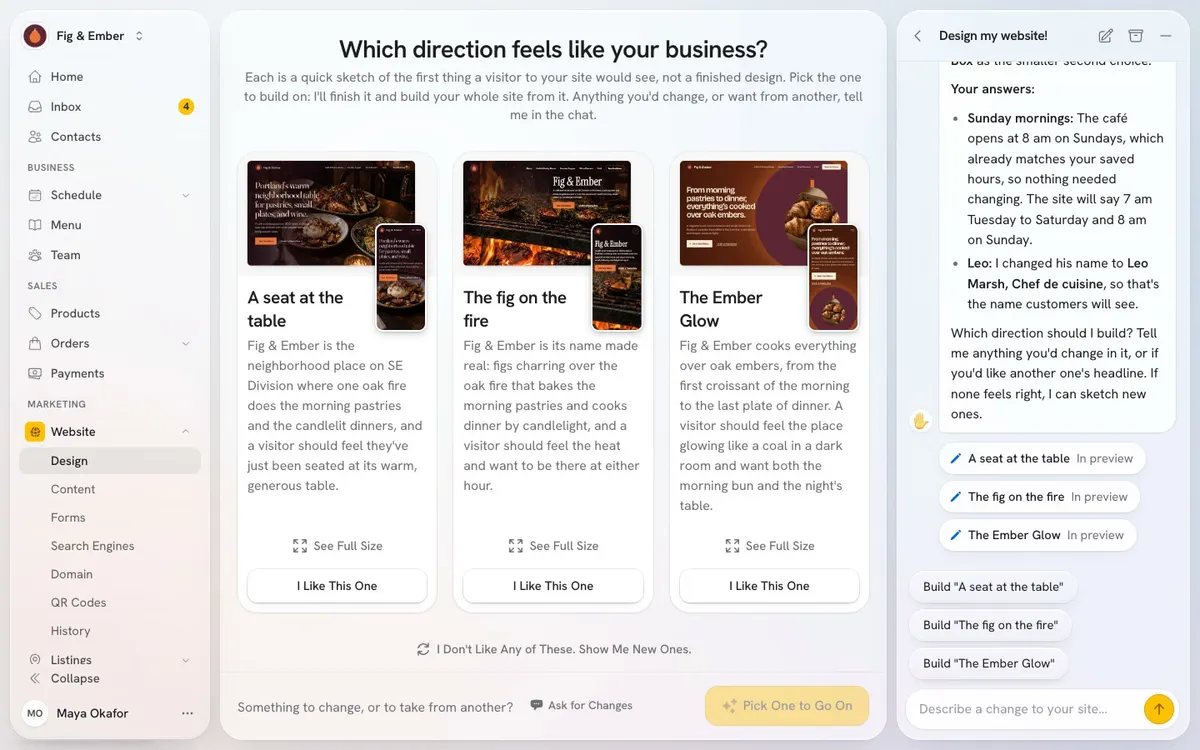
Three directions sketched for a restaurant, each with its own look and headline.
After that, you change it by asking the Hand in plain words, or by pointing at part of the page. You see the page before and after, side by side, and nothing is published until you approve it.
A new design asked for in one sentence, then looked over on the Website page.
Read more about the Basehand website.