 Basehand
Getting found
How to show up on Google Maps when people search nearby
When someone searches for a business like yours, Google decides who to show using three things. Here is what they are, which ones you can change, and how to keep your listing working for you.
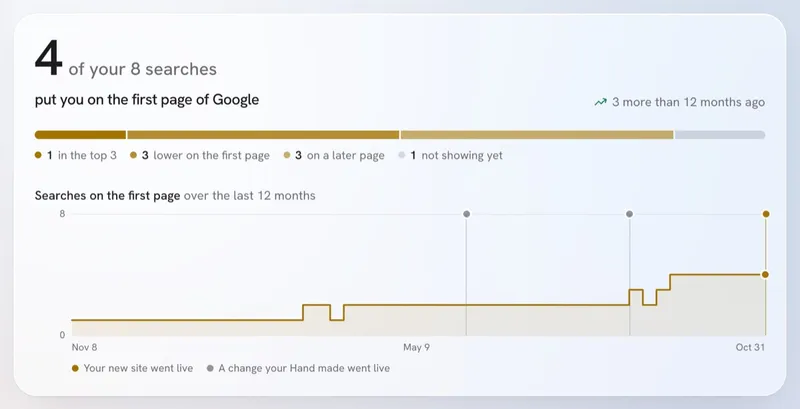
Search for "hair salon" or "plumber" on your phone and you'll see a map with a handful of businesses pinned on it, above the ordinary search results. For a lot of local businesses, that map is where most new customers come from. Being on it is worth more than almost anything else you can do online.
The good news is that Google is fairly open about how it chooses which businesses to show. The less good news is that there are no tricks. What works is a complete, accurate listing, kept up to date, with real reviews from real customers.
How Google decides who to show
Google says local results are based on three things.
Relevance is how well your listing matches what someone searched for. If a person searches for "gel nails" and your listing never mentions nails, Google has little reason to think you're a match.
Distance is how far you are from the person searching, or from the place they named in their search. You can't change this one. Google also notes that it sometimes shows a business further away if it seems more likely to have what the person wants.
Prominence is how well known your business is. Google looks at what it knows about you from across the web, including links to your website and articles that mention you. It also counts reviews: Google says the number of reviews and your rating are part of how you rank.
So the two you can work on are relevance and prominence. Everything below is about one or the other.
Claim and verify your listing
Your listing on Google Maps is called a Google Business Profile. If you've never claimed yours, there may already be one that Google made from other sources, possibly with old details. Search for your business name on Google Maps. If a listing appears, claim it. If not, create one.
Google then asks you to verify that you really run the business. Depending on the business, that might be a code sent by post, a phone call, an email, or a short video. A listing that isn't verified can't be fully managed by you, so this step comes first.
Fill in everything
Google's own advice is to give complete and accurate information, because it uses it to match you to searches. Go through every field.
Business name. Use your real name, as it appears on your sign. Adding extra words like "best nail salon downtown" breaks Google's rules and can get the listing suspended.
Category. Your main category matters a lot. Choose the most specific one that fits, such as "Hair salon" rather than "Beauty". You can add a few more for other things you do.
Address, or the area you serve. If customers come to you, give the address. If you go to them, set the area you cover instead.
Hours. Keep them right, including holidays. More on that below.
Phone number and website. Use a number that's answered and a website that works on a phone.
Description, services, and products. Say what you do in plain words, including the words customers use.
Add photos, and keep adding them
People look at photos before they decide where to go. Add pictures of the outside, so people recognize you from the street, and of the inside, your team, and your work. Real photos taken on a phone in good light are fine. Add new ones every so often, especially when something changes.
Keep your hours right
Wrong hours are one of the quickest ways to lose a customer's trust. If Google says you're open and someone arrives to a locked door, they're unlikely to try again.
Update your regular hours whenever they change, and set special hours for holidays and other closures. Our guide to updating your holiday hours covers the busy season in detail.
Get reviews, and answer them
Reviews help twice. They count toward prominence, and they're what people read before choosing you over the business next door. Ask every customer, in the same way, and make it easy for them. Our guide to getting more Google reviews explains how to do that within Google's rules.
Reply to reviews too, the good ones and the bad. A short, specific thank-you shows people that a person reads them. A calm, helpful reply to a complaint often does more for you than the complaint does harm.
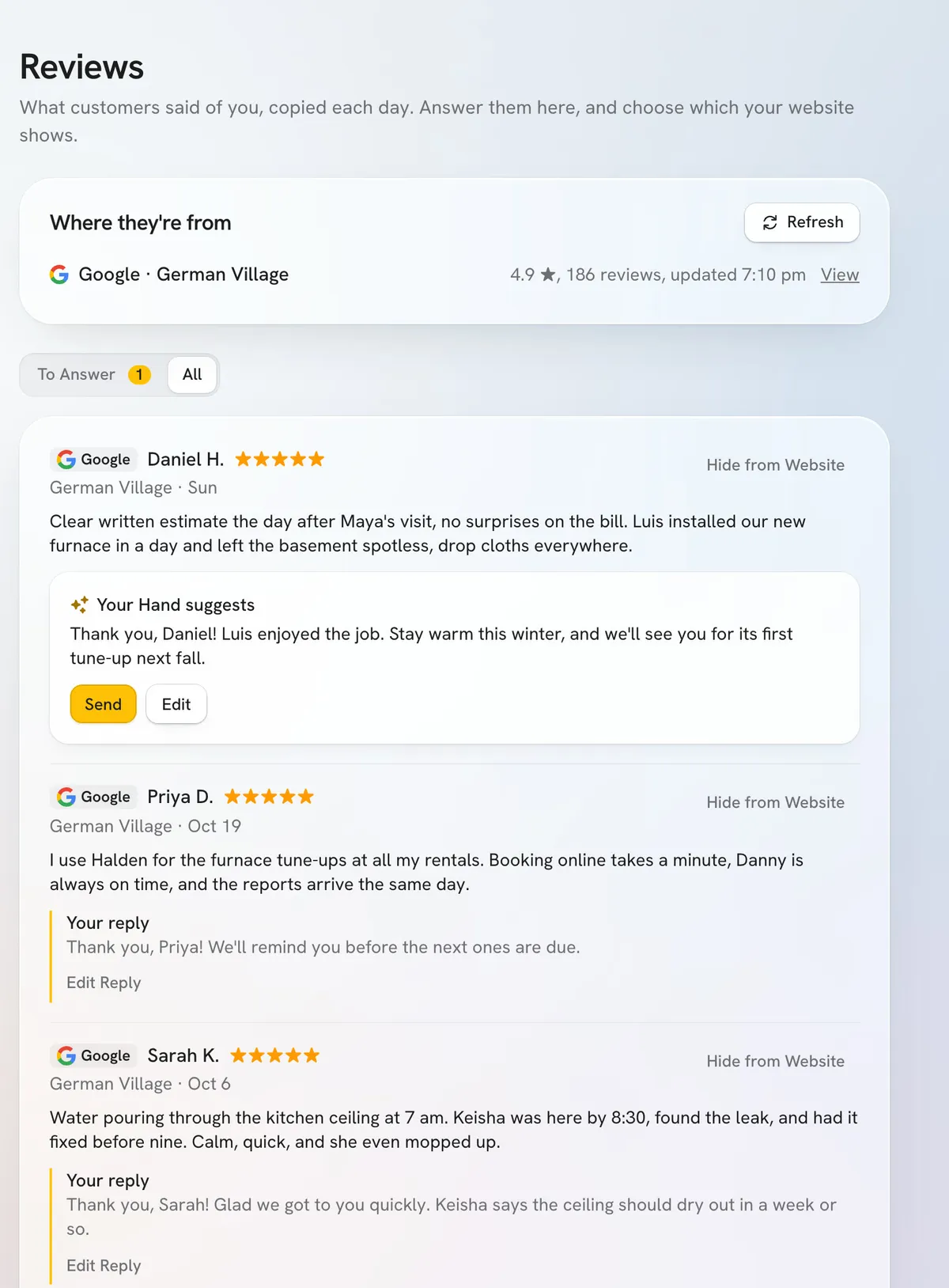
Every review answered, each reply specific to what the customer wrote.
Make your website back up your listing
Your listing links to your website, and Google reads both. Make sure your website says the same things: the same name, address, phone number, and hours. Describe your services on it in the words people search for. A website that clearly matches your listing helps Google trust that both are right. Our home page checklist covers what else it should say.
Don't try to game it
You'll find plenty of advice on shortcuts: stuffing keywords into your business name, listing an address where you don't really work, or buying reviews. All of them break Google's rules, and Google suspends listings and removes reviews for them. Buying fake reviews is also against the law in the United States. A suspended listing is far worse than a modest one.
A description and a checklist to copy
A description for your listing
Google allows up to 750 characters for a description. Use it to say what you do in the words customers search for, not for offers or links. Change the words in square brackets:
[Business name] is a [what you are, such as "family-run hair salon"] in [neighborhood, city]. We offer [your main services, in the words customers use, such as "cuts, color, balayage, and keratin treatments"]. [What makes you different, such as "Every color starts with a free consultation."] [Who you welcome, such as "Walk-ins and children are welcome."] [How to book, such as "Book online any time, or call us."]
A checklist for your listing
Go through it once now, and again every few months:
[ ] Listing claimed and verified
[ ] Name exactly as it is on your sign
[ ] The most specific main category, plus any extra ones
[ ] Your address, or the area you serve
[ ] Regular hours, and special hours for the next holidays
[ ] A phone number that's answered
[ ] A website link that works on a phone
[ ] Description, services, and products filled in
[ ] Photos of the outside, the inside, your team, and your work, some added in the last three months
[ ] Every review from the last month answered
[ ] Name, address, phone number, and hours the same as on your website
How Basehand helps
In Basehand, your listings are in Settings under Listings. Basehand can create your Google Business Profile, take you through Google's verification, or ask for access to a listing someone else set up, which the current owner approves on Google.
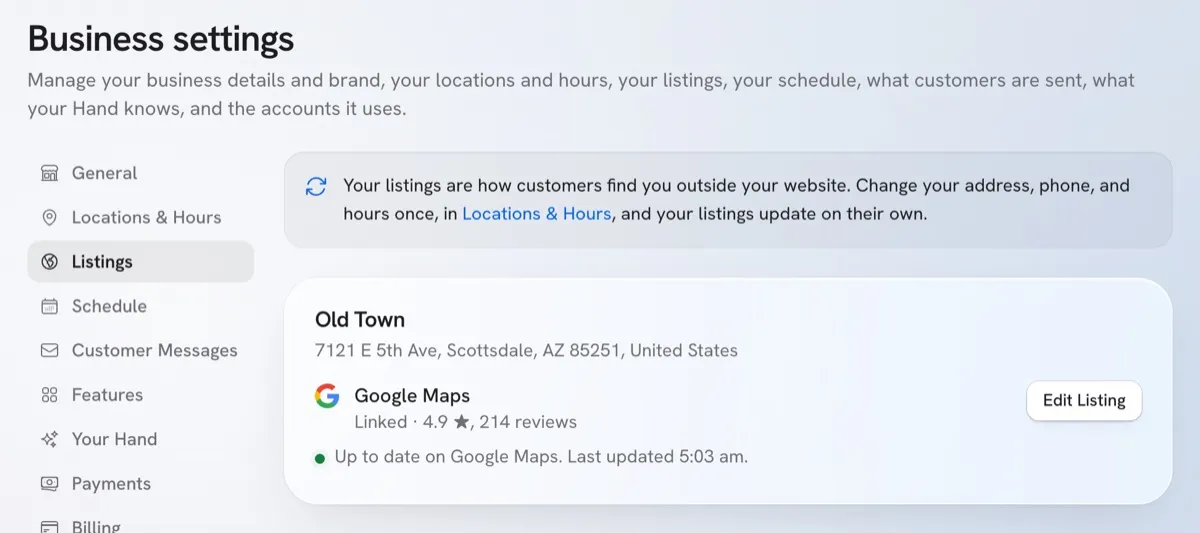
A location linked to its Google listing, kept up to date from Basehand.
Once your location is linked to its listing, Basehand keeps it in step with what you set in Basehand. Your weekly hours, phone number, address, and holiday hours go to Google automatically whenever you change them, and the booking link on your listing points to your online booking. You can also change your listing's name, category, website, phone, address, and hours from Basehand. Photos and your description are still managed in Google.
Each day Basehand checks your listing's hours and phone number against your own. If someone has changed them on Google, the Hand asks you which is right. Basehand also copies your Google reviews every day, so you can read and answer them in one place. Read more about Google, reviews, and Basehand's marketing tools.